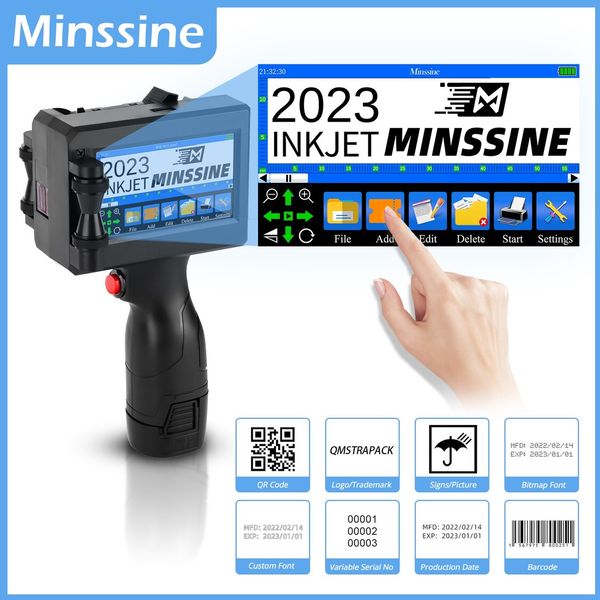
便攜式 12.7 毫米手持式噴墨印表機二維碼條碼批號徽標到期日期標籤列印槍 25 種語言非加密
商品詳情
即刻購買——! ! 7天無理由退款退貨!
本商品適用於“收到商品7天内,可無理由退貨退款”
可安心購買,更無需擔憂售後及保養問題
東九龍倉庫網站https://shophoho.com
客服WhatsApp:9444 2816
電壓:100-240伏
最大限度。解決:600*600dpi
使用:噴墨印表機
列印速度:40 百萬分之
雙面列印:不
Supports Network Printing:
Paper Feed Mode:Manual
Max Paper Size:A4
Type:Inkjet Printer
Interface Type:USB
Brand Name:Minssine
Origin:Mainland China
Certification:CE,RoHS
Printing Height:2 -12.7mm Adjustable
Ink Color:Black, White, Blue, Yellow, Red, Green, Invisible
Print Content:Date, Logo, Numbers, Symbols, Pictures, QR Code, Barcode, Variable Dat
Application Industry:Plate, Carton, Stone, Pipe, Cable, Metal, Plastic, Electronic Device,
產品優勢:非加密 – 易於在當地購買墨水匣。支援 25 種語言 – 滿足多樣化的全球客戶群。內建編碼器 - 更穩定,更有效率。可拆卸電池 - 更換電池,可順利延長使用時間。四核心處理器 - 更智能,反應更快。雙模式 - 不僅可以手持使用,還支援線上模式。嵌入式智慧型作業系統 - 操作簡單、友善。 4.3 吋電阻式觸控螢幕 - 鮮豔的彩色顯示屏,提供清晰的視覺效果和靈敏的互動。業界領先的工業設計 - 便攜性、外觀美觀、符合人體工學原理。耐用優質按鈕 – 採用堅固優質按鈕,更耐用專業服務:工廠直銷和客製化服務:體驗工廠直銷,提供靈活客製化選項,包括 OEM 服務和個人化加密解決方案。從特定的 Boot 標誌介面到客製化請求,我們都能滿足您的需求。聯絡我們的客戶服務以取得專業支援。專業且友善的全天候支援:享受我們專業且及時的客戶服務的可靠性,全天候提供。無論是售前諮詢還是高效的售後支持,我們都致力於提供個人化的解決方案以滿足您的要求。快速處理和全球運輸:受益於我們快速處理和準時交貨的標誌。我們的全球運送服務提供即時訂單追蹤、精心的產品包裝和多種運送選擇,確保高效可靠的購物體驗。您的滿意是我們的首要任務—請隨時聯絡我們尋求協助。您最關心的問答:1.Q:How to better extend the life of the printer ?A:Before installing and removing ink cartridges, be sure to turn off the printer.2.Q:How to better protect the ink cartridge zzle?A:When t using ink cartridges, please close the protective cover in time.Dip a soft paper towel with a small amount of alcohol before using, and then gently wipe the zzle in one direction.3.Q: Why does the printer screen t work?A: When you find that the screen of the printer is t working, please calibrate the screen of the printer.4.Q: Can the printer be equipped with photoelectric sensors?A: Yes, our inkjet printer has an adapted photoelectric sensor. Please consult customer service before purchasing.5.Q: Can the printer print on the bottle?A: Yes, we will provide you with a metal positioning plate for free, For specific steps,please consult customer service.6.Q: What should I do if the printer cant print?A: ①Check whether the rubber ring on the left side of the printer is off (t in the groove).②Check if there the ink cartridge is installed properly.③Switch the zzle of the printer in the settings.④ After turning off the printer, reinstall the ink cartridge.⑤If you have completed all the above operations and the machine still cant operate rmally, please contact customerservice in time.7.Q: The ink cartridge of the printer can print, but the printing is t clear, what should I do?A: ①Check whether the ink cartridge zzle is clean and dry, and wipe the zzle carefully with a clean soft tissue.② Take out the ink cartridge when the printer is off, shake the cartridge several times, and stick a clean tissue on thesurface of the zzle to divert the ink.(Ask customer service for operation videos)③Switch the zzle of the printer in the settings.④The above operation still cant be solved, please consult customer service.8.Q: What should I do when there is a printer phemen of wire drawing?A: The ink cartridge is quick-drying. When there is a phemen of wire drawing, please wipe the zzle carefully with a cleansoft tissue and switch the zzle of the printer.When t using the ink cartridge, please install the cover in time.9.Q: Can the printer be charged?A: Yes. TIPS:① Please remove the battery at the bottom of the printer and charge it separately to avoid damage to the printer.②Please use our special charger to charge the printer.③When the printer is stored for a long time and t in use, it is recommended to safely charge and discharge it every three months.
送貨詳情
付款方式


便攜式 12.7 毫米手持式噴墨印表機二維碼條碼批號徽標到期日期標籤列印槍 25 種語言非加密
數量
同店推薦