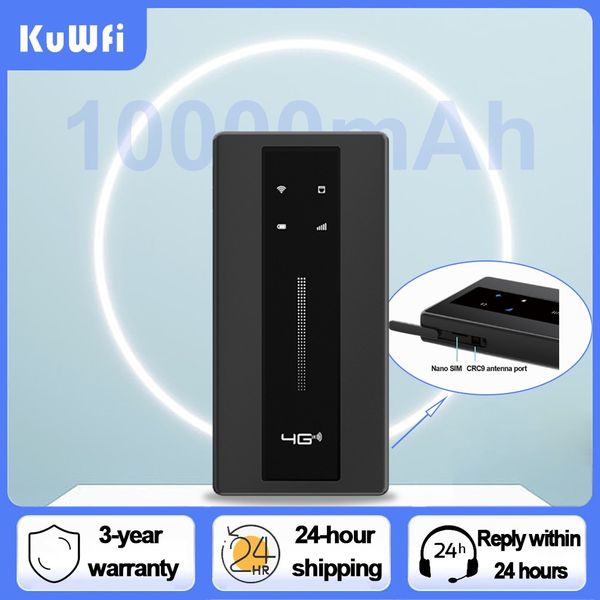


KuWFi 150Mbps 口袋 WiFi 10000mAh 便攜式戶外旅行移動 Wifi 熱點帶 RJ45 TS9 無線路由器覆蓋範圍廣
$511
商品詳情
即刻購買——!
!
7天無理由退款退貨!
本商品適用於“收到商品7天内,可無理由退貨退款”
可安心購買,更無需擔憂售後及保養問題
東九龍倉庫網站https://shophoho.com
客服WhatsApp:9444 2816
5G Wi-Fi傳輸速率:NO
有線傳輸速率:NO
Wi-Fi傳輸標準:802.11ac
2.4G Wi-Fi傳輸速率:150 Mbps
Wi-Fi 支援頻率:2.4G
Supports WPS:Yes
Number of USB Interfaces:1 x USB
WAN Ports:1 x10/100Mbps
LAN Ports:1
Function:Firewall
Application:outdoor
Package:Yes
Standards And Protocols:Wi-Fi 802.11g
Max. LAN Data Rate:150Mbps
With Modem Function:No
Type:WireLess
Brand Name:KuWFi
Origin:Mainland China
Certification:CE
尖端:1.路由器No包含 SIM 卡,您應該從當地購買 SIM 卡。2.購買前請檢查SIM卡的網路頻段。如果SIM卡No符合要求,請No要購買,No則將無法使用。(購買前可諮詢店舖客服)3.插入SIM卡後,需手動設定APN資訊才能上網。(如遇到問題請聯絡客服)頻帶:歐盟版本:它的設計針對俄羅斯、亞洲、歐盟和中東4G FDD-LTE:B1、B3、B7、B8、B20 4G TDD-LTE:B38、B40 WCDMA/HSDPA/HSUPA:B1主要功能內建10000mAh大容量電池內建10000mAh大容量電池,延長路由器的使用時間。在戶外使用時,無需擔心電池快速耗盡。150Mbps 4G LTE 路由器該設備搭載了4G網路晶片。最佳速度可達150Mbps。讓您更好的觀看視頻,玩遊戲等。帶指示燈顯示使用者可以直接從路由器上的指示燈了解Wi-Fi訊號、SIM卡、電量、訊號強度的狀態。小尺寸和超薄設計為了更方便攜帶,路由器採用小尺寸和超薄設計。支援10個用戶/裝置連接網路連線共享可達 10 個 WiFi 使用者/設備,與家人或朋友同時上網且無延遲。支援多種設備支援市面上多種電子設備,讓您在No同的設備上共同享受網路的樂趣。產品規格電池:10000mAh Wi-fi 協定:802.11 b/g/n尺寸:148mmx78mmx17mm下載速度:高達 150Mbps上傳速度:高達 50Mbps Web UI 語言:中文和英文充電埠:Type-C℃ 連接埠:RJ45 至℃溫度:10 % 至 90%儲存濕度:5% 至 95%軟體包列表1x 4G LTE Router1x USB Cable1X English Manual Shipping time and trackingWe use safe trackable shipping methods to ship parcels ,below is estimated delivery time for different countries :Asian countries 7-10 days .European countries 7-15 days .United States 10-15 days .American countries 15-25 days .Brazil 15-45 days .ServiceCustomer service working hours:Beijing 9:30-18:00Ship orders within 48 hours (except weekends)router/wifi router/router wifi/roteador/роутер wi fi/роутер/modem 4g wifi sim card/roteador wifi/공유기/راوتر/4g router/роутер с сим картой 4g/wifi роутер/라우터/4g wifi modem/router 4g para tarjeta sim/와이파이/lte 라우터/pocket wifi router/modem 4g/4g sim wifi router/роутер wi fi для украіни/access point wifi/4g wifi роутер/routeur wifi/routers/router sim card/lte router/wifi inalambrico portatil/4g модем/вай фай роутер/pocket wifi/router wifi sim card/router sim/4g lte router/wifi portátil/mini impresora portatil/router 4g/modem wifi/sim router/sim card wifi routerFAQ:Q1:Why can't the device recognize the SIM card?A1: Please insert SIM card into the router for one minute first,then turn on the power. If still not recognized the SIM card,please install another SIM card from another SIM card operator.Q2:Why can't I use the internet when I insert a SIM card?A2:Even if your SIM card is compatible with the product, it is not necessarily plug and play, you need to disable the SIM card PIN and modify the APN.Q3:How do I modify the APN?A3: Enter the router IP address and search for APN Settings. Modify the APN. You can query the APN of the SIM card on the carrier's official website or mobile phone. Verify that the SIM card is activated.Q4:The router cannot search for wifi?A4: Please check the wifi light is on or off?If the light is on ,maybe wifi was hidden ,please log in web ui to enable the wifi name.Q5:The router's network speed is slowA5: The router needs to capture the signal and transmit the WiFi signal again, so it will be slower than the phone.If your speed is slow ,this is according your local case,or your can try other sim card .Speed is different.Q6:Signal is unstable?A6: You can also manage the settings page, lock 4G or 3G network, can effectively improve the stability of the network.Q7:All settings are correct, but the device still cannot connect to the network?A7: please consider whether it is caused by the following problems:Account got suspended for too much data usage.Is the SIM card an IoT card?the sim card have limited service ,not work with router or hotspot.some place did not cover the network Frequency band.
送貨詳情
付款方式


KuWFi 150Mbps 口袋 WiFi 10000mAh 便攜式戶外旅行移動 Wifi 熱點帶 RJ45 TS9 無線路由器覆蓋範圍廣
$511
數量
同店推薦
關於我們
如何購買
條款細則
聯絡我們
HOHO MALL / HOHO商城(香港九龍東倉庫網站平臺)
WhatsApp: 9444 2816
聯絡電郵:batishgarth@gmail.com
週一至週六: 09:00-22:00
星期天: 09:00-20:00
公眾假期: 休息